
What Is a Button Box and Why Use One in Star Citizen?
27/03/2025
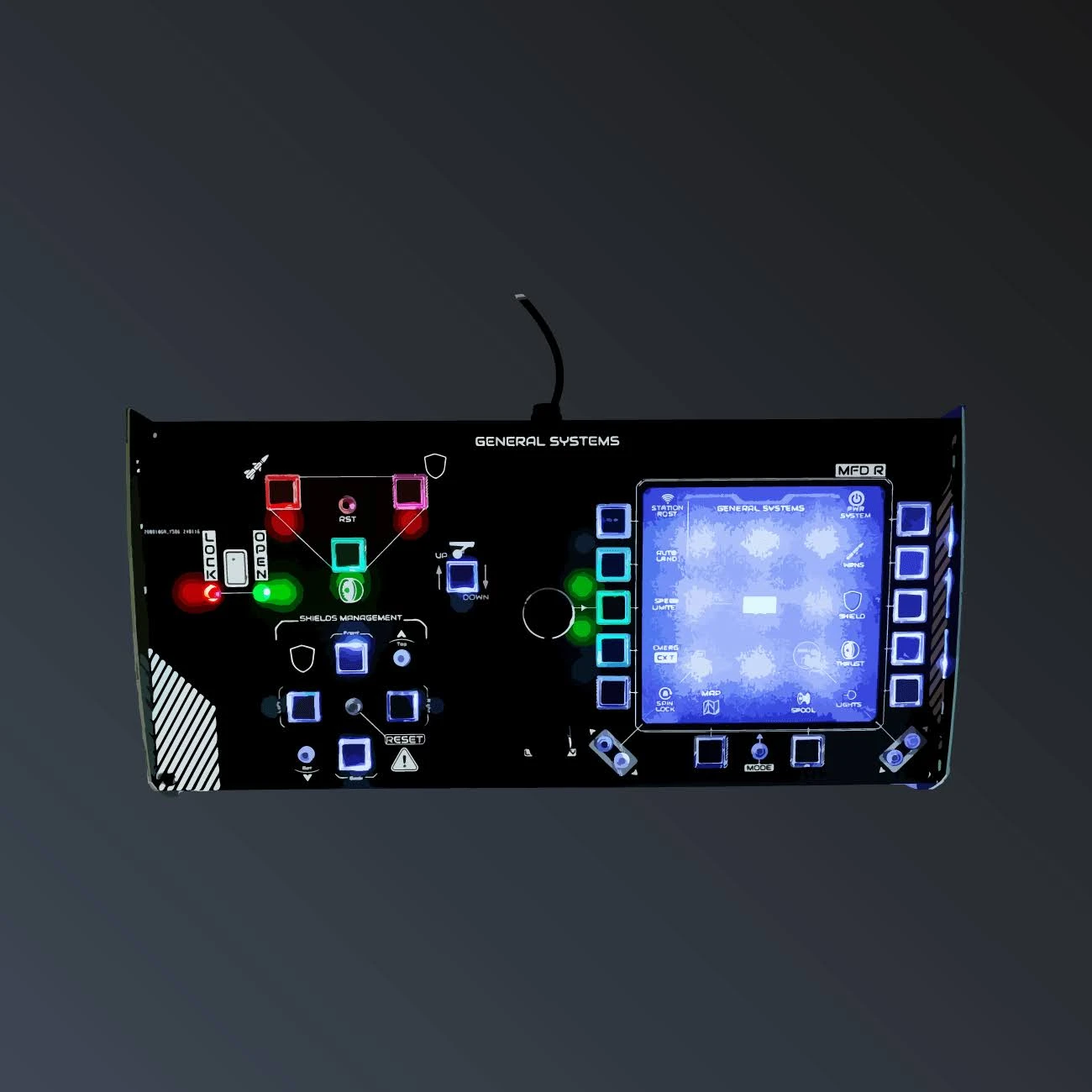
The term button box comes up a lot in sim setups, but what exactly is it, and why is it so useful in Star Citizen? Here's a simple explanation.
What is a button box?
A button box is a panel of physical switches and buttons, connected via USB, that you configure to trigger in-game commands. Each button maps to a specific action: engines on, deploy gear, manage power, activate a scan… Instead of memorising dozens of keyboard shortcuts, you press a clearly labelled switch.
Why it's perfect for Star Citizen
Star Citizen is known for its simulation depth: a ship means dozens of systems to manage. That's exactly the ideal playground for a button box. You gain speed (one action = one button), reliability (no more wrong-key errors) and above all immersion: flipping physical switches feels like flying a real ship.
How to choose the right one
Favour a plug & play model (recognised without drivers), with clear labels matching in-game functions, and solid build quality. That's exactly the philosophy of our panels: the General Systems panel for ship management, the Targeting panel for combat, the Mining panel for industry. Backlit, labelled and made in France.
A button box is the small step that turns a keyboard session into a true piloting experience. See you in the 'verse!
Related products
Also read


Get news and exclusive offers.